


One system for the whole plant
MRP, purchasing, lots and work orders, plus OEE, SPC and downtime from the floor. One system, one audit log. It deploys into your own AWS or Azure account.
Now taking pilot plants. We reply within one business day.
Today the plan lives in five places
None of them agree. Here is what each one costs.
The MRP spreadsheet
What it does: Netting done by hand, in a workbook.
What it costs you: One broken formula and a part runs out.
The legacy ERP
What it does: Licensed per module. Rolled out as a project.
What it costs you: No number until the project ends. The BOM stays in Excel.
The point tools
What it does: A forecasting app that can't see stock or the quality log.
What it costs you: Three logins to answer one question.
The OEE box
What it does: Dedicated hardware that measures one thing.
What it costs you: Priced like it runs the whole plant.
The planner's head
What it does: The one person who knows why the BOM is wrong.
What it costs you: When they leave, the plant finds out the hard way.
Total
Five versions of the plan, reconciled by hand.
EvoWerk Cloud MRP: one Postgres database for BOMs, stock, orders, jobs and lots. One login. One append-only audit log.
Plan, buy, make, store, measure. One record underneath
Data comes in from what you already run. Every workspace reads and writes the same records. Answers go out to screens, alerts and reports.
In 13 connector types
- CSV · ExcelUpload any time
- SQL Server · Oracle · Postgres · MySQLScheduled sync, every 60 s or slower
- OPC-UA · OPC-DA · MQTT · OSIsoft PIShop floor and historians, on demand
- REST · SAP ODataERP and MES, on demand
Connector passwords are encrypted at rest.
One record
- PlanSales orders · demand forecast · BOMs and revisions · MRP
- BuySuppliers · purchase orders · draft POs straight from the plan
- MakeWork orders · routings · machines · shifts · pace tracking
- StoreLots, consumed earliest-expiry first · QA holds · warehouse locations
- MeasureOEE · SPC · downtime · throughput · scrap and first-pass yield
Postgres 16 · append-only audit log
Out
- KPI wallsFullscreen on the shop-floor TV, refreshing on their own
- AlertsThreshold rules that can call an andon or relay webhook
- ReportsReport builder, with optional AI narration
- AskPlain-language questions over your datasets
Ask and narration run on Google Gemini.
Core runs the five workspaces, KPI walls, reports and Ask. Premium adds the models: predictive maintenance, root cause analysis, AutoML, simulation, manufacturing forecast and computer vision. Datasets, BI dashboards, integrations, alerts and process mining come with every plan.
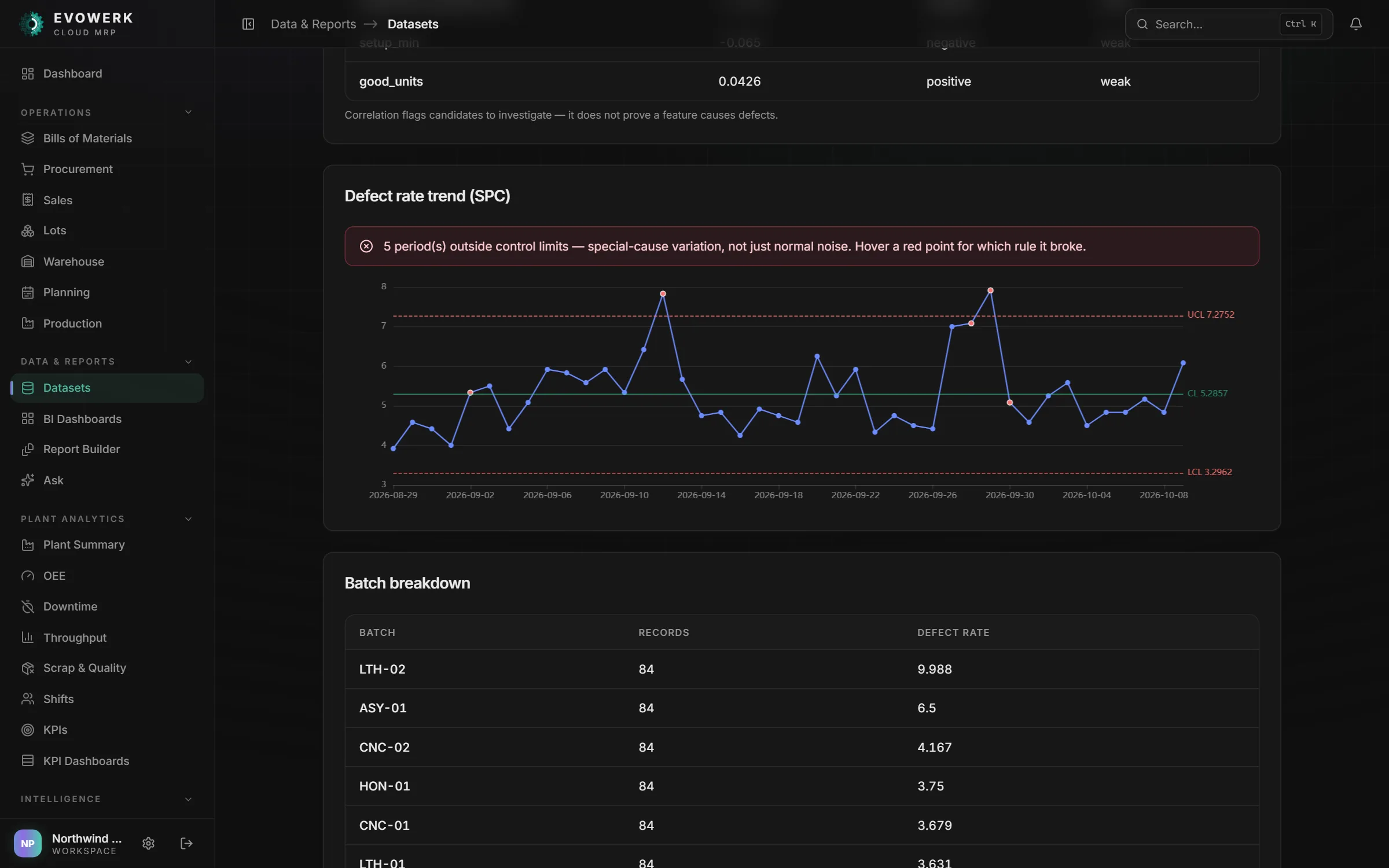
- Discreteall eight Nelson rules on every SPC chart
- Food and perishablesearliest expiry consumed first, held lots skipped
- Pharma and regulatedan audit log the database itself keeps append-only
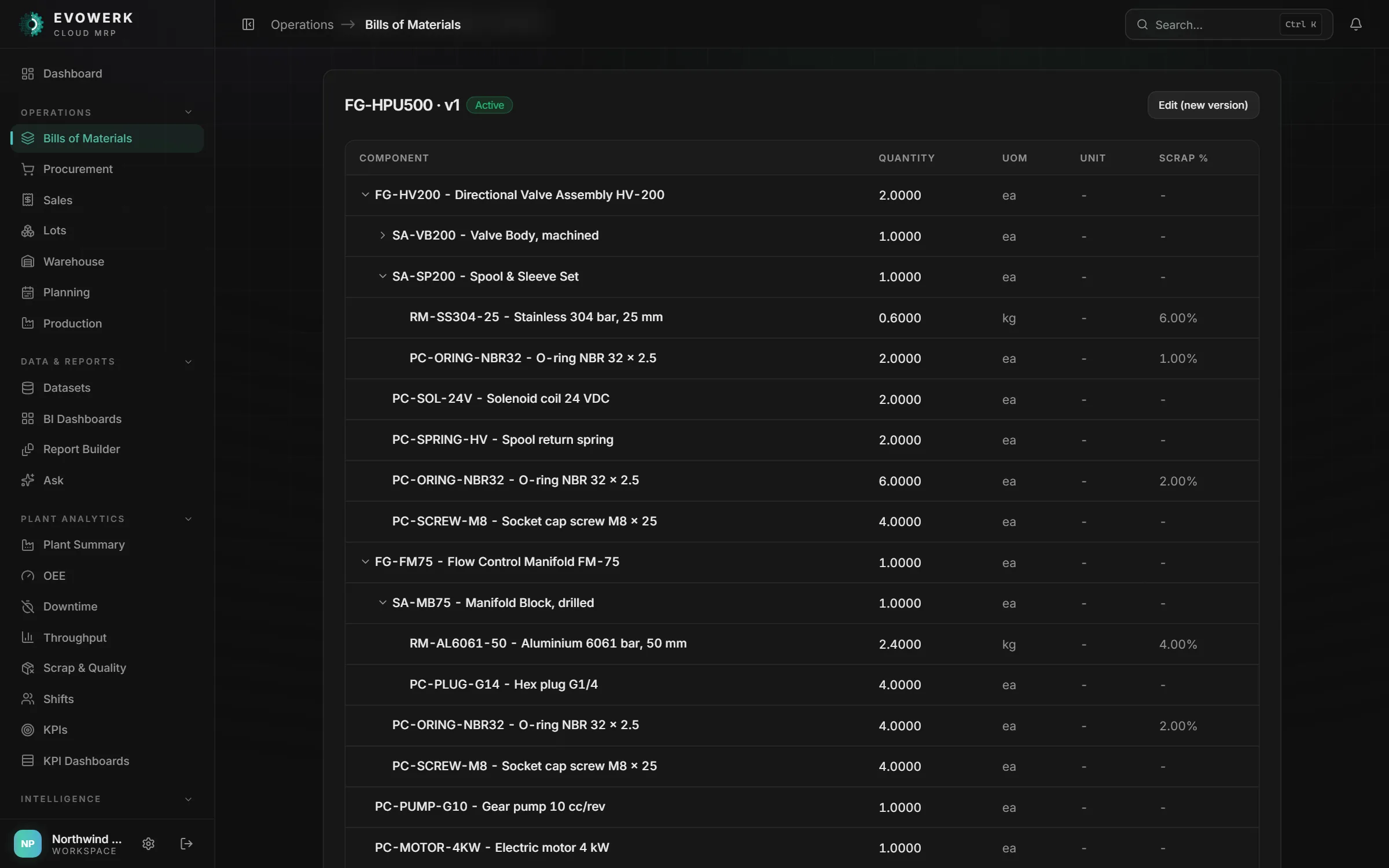
- Automotive and assemblyBOM revisions across engineering changes
Distribution or retail instead of a plant? EvoWerk Inventory is a separate app, live now and free to start.
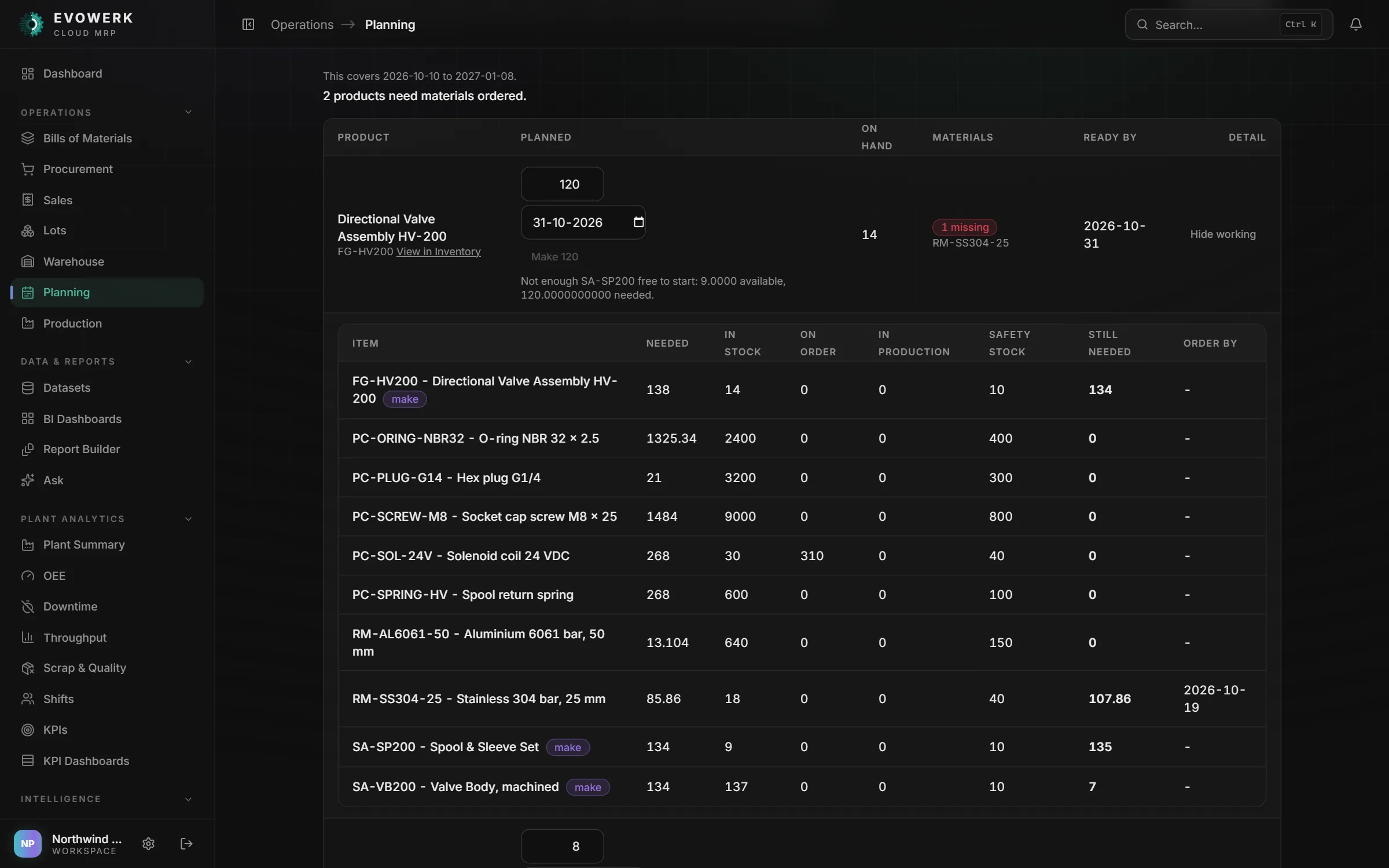
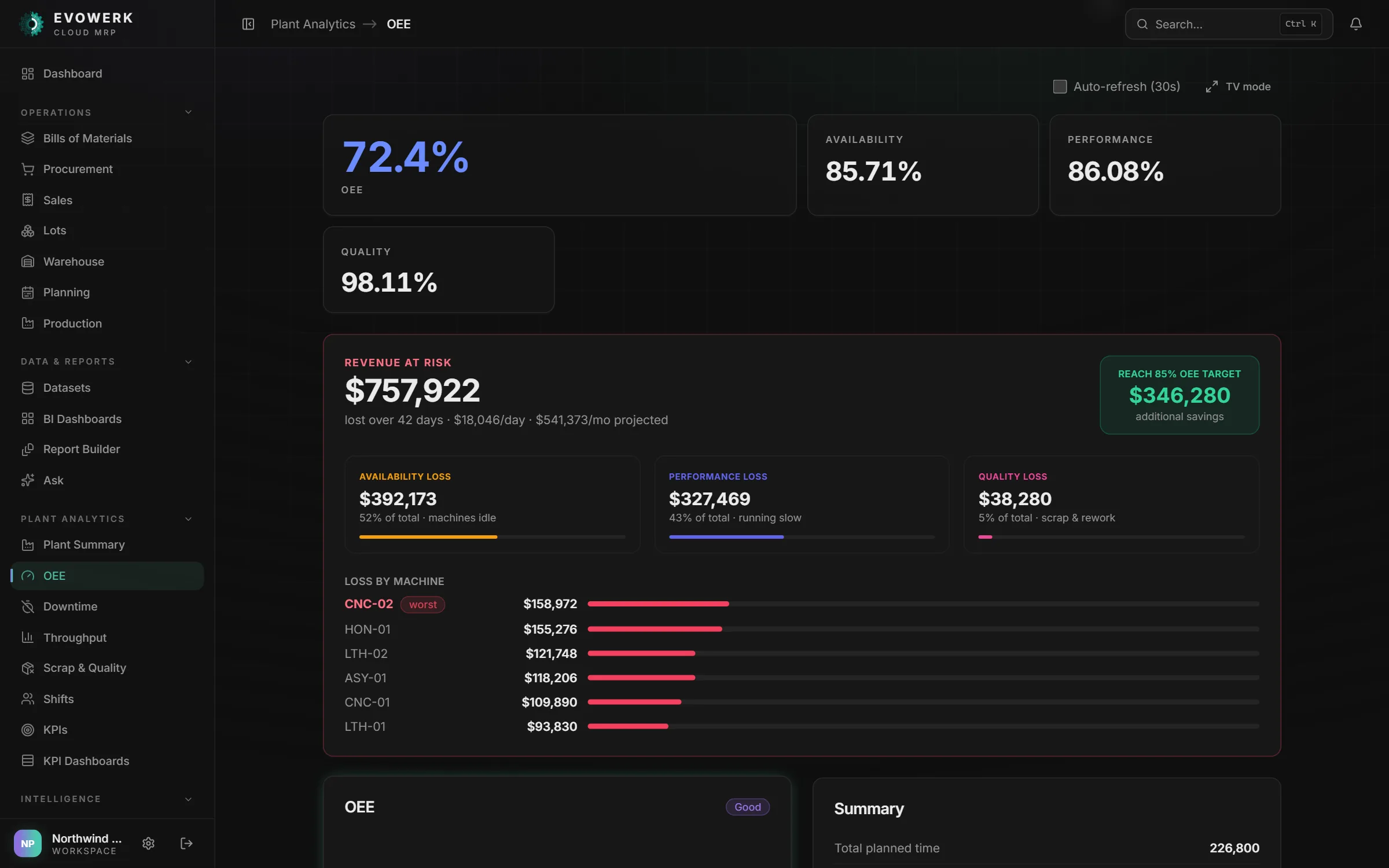
The running app, on sample plant data
Six screens from EvoWerk Cloud MRP with demo data loaded. No customer's plant.
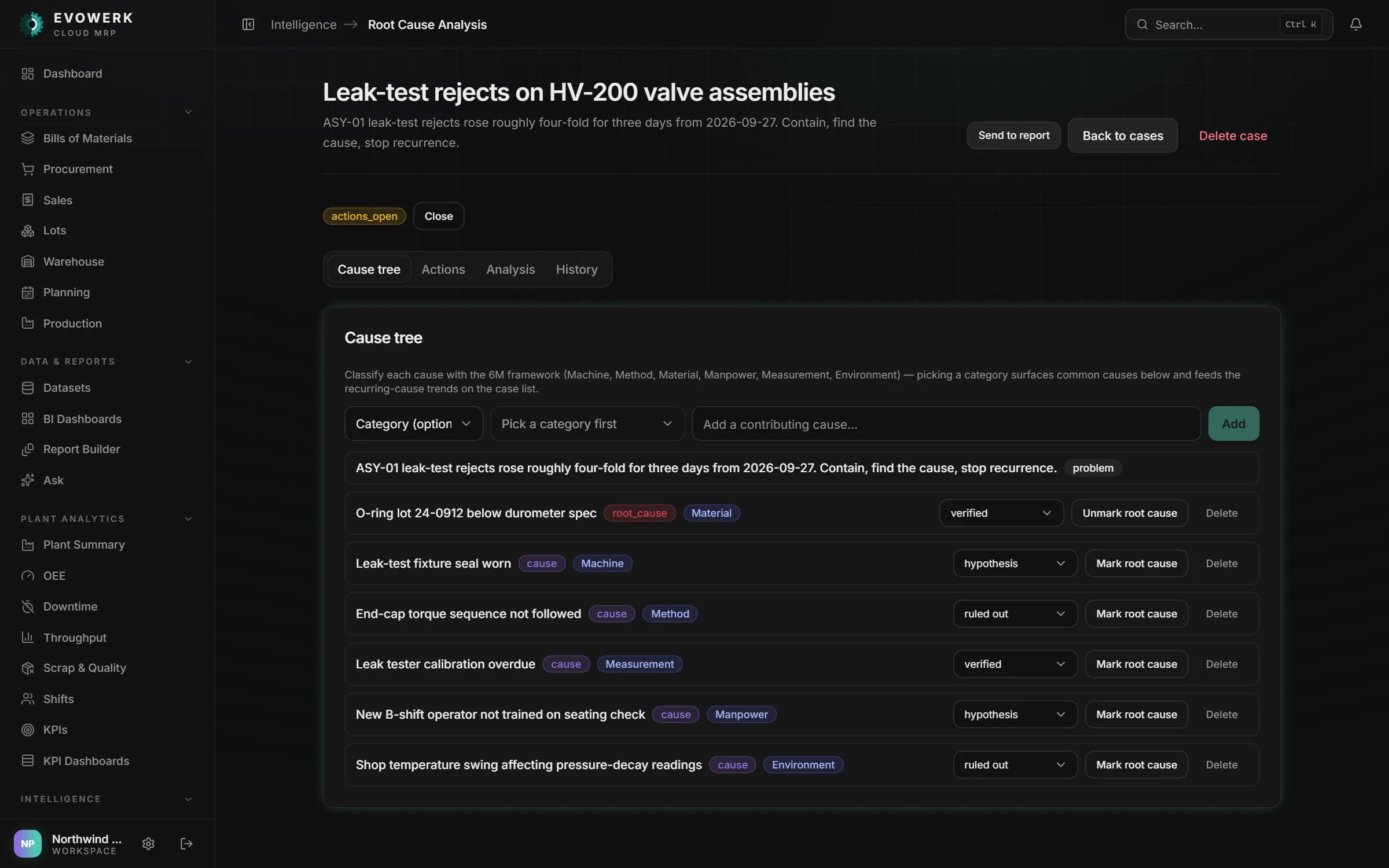
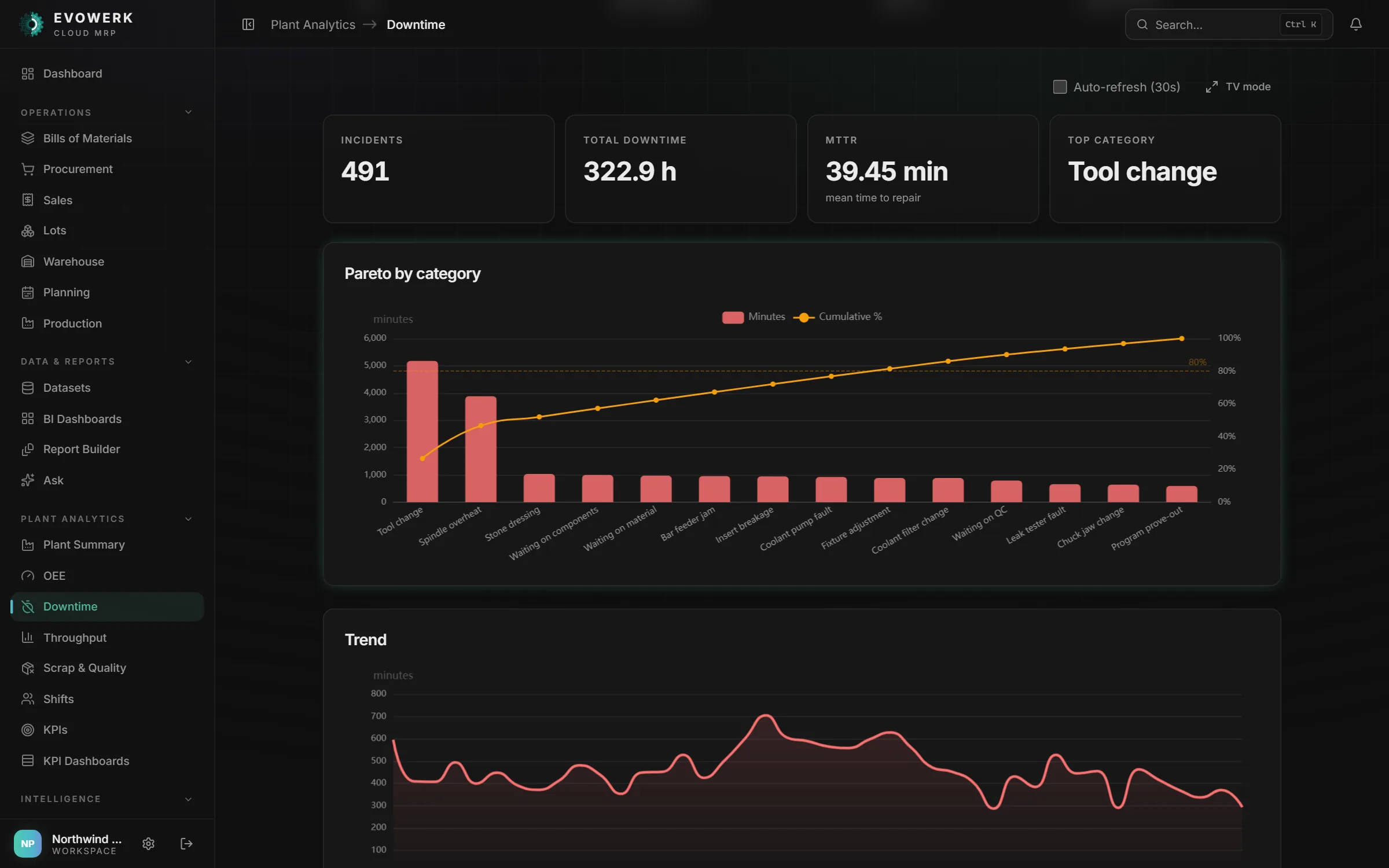
It flags the problem before anyone goes looking
One shift, and the parts of the app that speak up along the way.
Before the first shift
Morning brief
The dashboard lists lots on QA hold or expiring within 14 days, jobs that should have started and haven't, and jobs running past twice their expected time. Expected time comes from the routing, else the median of the item's last five jobs.
Shift start
QR check-in
Each machine gets a printable QR code. An operator scans it and taps their name to run that machine under it. No app login needed, and badge or RFID readers can send the same signal.
On the floor
KPI walls
Operator walls run fullscreen on a TV with a fast refresh. Supervisor walls show the full detail.
When a line drifts
Alerts and anomalies
Rules on downtime, quality, scrap, stock, a production target or a synced data feed. A rule can call an andon or relay webhook. With Predictive Maintenance, every sensor reading is scored against its last 200 on all eight Nelson rules.
Anomaly scoring is Premium
When you need to know why
Process mining, simulation, AutoML
Process mining finds the real flow in any event log: bottlenecks, rework loops, cases that leave the usual path. Simulation runs what-ifs on capacity, cost, OEE and throughput, with P10, P50 and P90 bands. AutoML templates predict downtime risk, machine failure and scrap from your own history.
Simulation and AutoML are Premium
No logos yet. Here is how it's built instead
Each line names the mechanism and where it's enforced: a database trigger, a Terraform test, a CI gate.
- 1,000+ backend tests in 145 modules
- 700+ frontend tests in 112 files
- Build fails under 70% backend or 95% frontend line coverage
Audit rows can't be changed
A Postgres trigger rejects every UPDATE and DELETE on the audit log. CI runs the migrations against real Postgres and tries both.
trg_audit_logs_immutable
Production data stays in your account
It deploys into your own AWS or Azure account. The optional AI features (Ask, image analysis, report narration) send what you submit to Google Gemini.
Terraform · AWS + Azure
One tenant can't read another
Every table carries org_id and every lookup filters on it, with cross-tenant tests. Isolation lives in the application, not in database row-level security.
org_id on every table
A password alone doesn't get in
Passwords hashed with argon2. TOTP MFA, its secret encrypted at rest, and a new factor must verify before the old one drops. Google and Microsoft sign-in. Five failed logins lock the account for 15 minutes.
argon2 · TOTP · 5 → 15 min
The database is never public
Terraform tests assert Postgres has no public endpoint on either cloud. On AWS they also check it is encrypted, takes traffic only from the app’s own security groups, and sits behind a load balancer open on ports 80 and 443 only.
terraform test · 30 assertions
A known vulnerability fails the build
bandit, pip-audit, npm audit, Trivy (container images and Terraform), Checkov and detect-secrets run in CI. A finding over the gate stops the build.
6 scanners in CI
You hear about an outage first
CloudWatch or Azure Monitor alarms on 5xx errors, crashed or saturated backends, and database CPU and disk. Browser errors report to your own backend, not to us.
CloudWatch · Azure Monitor
Not done yet
No SOC 2 or ISO 27001 report. Roles are coarse: owner, manager and member. We'll say the same on your security questionnaire.
How a pilot starts
Now taking pilot plants. Pilots work directly with the people building it. No public price list yet: pricing is quoted after the demo.
Demo
Twenty minutes on your own file: a BOM, a stock ledger or a week of downtime.
Deploy
Into your AWS or Azure account from our Terraform: containers, a private Postgres 16 database, secrets in AWS Secrets Manager or Azure Key Vault. EvoWerk doesn't host it.
Connect
Start with CSV or Excel. Then schedule a sync from SQL Server, Oracle, Postgres or MySQL.
Run
Core for the whole plant. Turn on Premium when the history is there: a machine's own failure model needs five recorded breakdowns.
What evaluators ask first
If yours isn't here, email support@evowerkintelligence.com. We reply within one business day.
Can we run it at our plant now?
Yes, as a pilot plant. EvoWerk Cloud MRP is taking pilot plants now: you get the software, its test suite and the Terraform to deploy it into your own cloud, with direct access to the people building it. There are no public case studies yet.
Where does it run — your cloud or ours?
Yours. It deploys into your own AWS or Azure account from our Terraform, so production data stays in your account and EvoWerk is not in your uptime path. The optional AI features — Ask, image analysis and report narration — send the content you submit to Google Gemini.
How does our machine and ERP data get in?
Upload CSV or Excel any time. Schedule a sync from SQL Server, Oracle, Postgres or MySQL — every minute or slower, five minutes by default. OPC-UA, OPC-DA, MQTT, OSIsoft PI and REST/SAP OData connectors pull on demand. For continuous sensor data, stream it into a database in your cloud and EvoWerk polls it.
What is the difference between Core and Premium?
Core has twenty features: bills of materials, procurement, sales orders, production, lots, warehouse, planning, plant summary, OEE, pace tracking, downtime, downtime tracking, throughput, scrap and quality, shifts, SPC, KPIs, KPI dashboards, the report builder and Ask. Premium is all of Core plus predictive maintenance, root cause analysis, AutoML, simulation, manufacturing forecast and computer vision on uploaded images. Datasets, BI dashboards, integrations, alerts and process mining come with every plan.
How does the MRP decide what to buy?
Gross demand is exploded through the BOM, then netted against on-hand stock, open and draft purchase orders and work in progress. Safety stock is added, need-by dates are offset by each item’s lead time, and order quantities are rounded up to the supplier’s minimum. The plan can raise the missing materials as draft purchase orders, grouped by each item’s preferred supplier.
How is security handled?
Audit-log rows are append-only: a Postgres trigger rejects every update and delete, and CI re-proves it against real Postgres. Passwords use argon2, accounts lock for 15 minutes after five failed logins, TOTP MFA and Google or Microsoft sign-in are supported, and connector credentials are encrypted. Tenant isolation is enforced in the application. There is no SOC 2 or ISO 27001 report yet.
What does it cost?
There is no public price list yet. Pricing is quoted after the demo.
See it on your own numbers
Bring one BOM, one stock ledger or one week of downtime. We load it and walk through the MRP explosion and the purchase orders it drafts. Your finance system stays where it is.
Now taking pilot plants. We reply within one business day.